



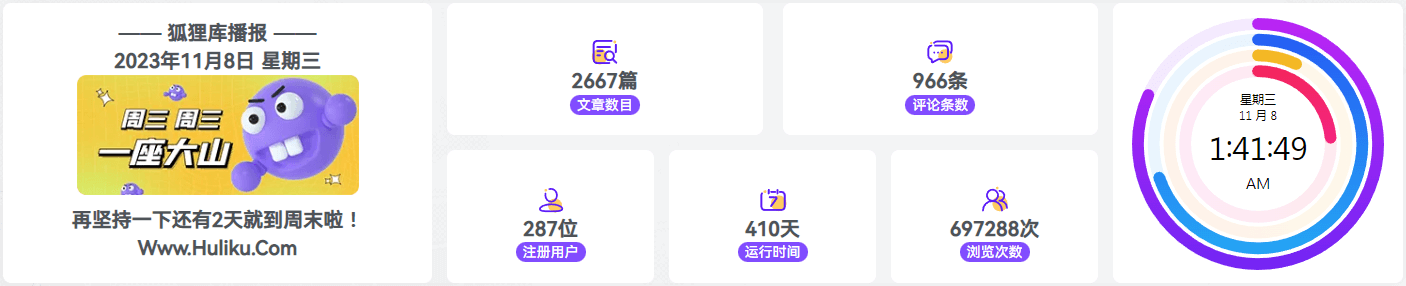
效果预览
![图片[1]-子比主题美化 – 图片&随机背景文字三栏组合广告位-狐狸库](https://huliku.com/pic/20250224231940655.png)
代码部署
<div class="ercdh">
    <div class="ercdh_1 ">
        <!-- 待写幻灯片 -->
        <div class="sbaner">
            <a href="https://huliku.com/" target="_blank">
                <img src="图片地址" style="width:330px; height:100%;">
            </a>
        </div>
        <div class="sbaner">
            <a href="https://huliku.com/" target="_blank">
                <img src="图片地址" style="width:330px; height:100%;">
            </a>
        </div>
    </div>
    <div class="ercdh_2">
        <!-- 待写标签统计 -->
        <section class="bqct mhs-flex-container">
            <a href="https://huliku.com/" class="random-color">狐狸库</a>
        </section>
        <section class="bqct mhs-flex-container">
            <a href="https://huliku.com/" class="random-color">狐狸库</a>
        </section>
        <section class="bqct mhs-flex-container">
            <a href="https://huliku.com/" class="random-color">狐狸库</a>
        </section>
        <section class="bqct mhs-flex-container">
            <a href="https://huliku.com/" class="random-color">狐狸库</a>
        </section>
        <section class="bqct mhs-flex-container">
            <a href="https://huliku.com/" class="random-color">狐狸库</a>
        </section>
        <section class="bqct mhs-flex-container">
            <a href="https://huliku.com/" class="random-color">狐狸库</a>
        </section>
        <section class="bqct mhs-flex-container">
            <a href="https://huliku.com/" class="random-color">狐狸库</a>
        </section>
        <section class="bqct mhs-flex-container">
            <a href="https://huliku.com/" class="random-color">狐狸库</a>
        </section>
        <section class="bqct mhs-flex-container">
            <a href="https://huliku.com/" class="random-color">狐狸库</a>
        </section>
        <section class="bqct mhs-flex-container">
            <a href="https://huliku.com/" class="random-color">狐狸库</a>
        </section>
    </div>
</div>
© 版权声明
本站除原创内容,其余内容均收集自互联网,仅限用于学习和研究目的,本站不对其内容的合法性、可用性承担任何责任。本站禁止以任何形式发布或转载任何违法相关信息,若您发现请立即向站长举报;用户投稿一切资源内容不代表本站立场,并不代表本站赞同其观点和对其真实性负责。
如有版权内容,其版权均归原作者所有,本站虽力求保存原有版权信息,但因众多资源经多次转载,已无法确定其真实来源,故敬请原作者谅解!为尊重作者劳动成果,请购买正版支持作者,谢谢!若您对「HULIKU.COM」所载资源作品版权归属存有异议,请发送邮箱:ihuliku@qq.com 进行处理。
本站资源文件大多存储至云盘,如您发现图片或链接失效,请联系站长或作者,我们将及时进行更新。资源都是经过站长或作者收集测试优化后进行发布分享。如若转载请在贵站文内以超链形式注明狐狸库文章出处,谢谢合作!
THE END







![子比主题美化 - 文章列表显示自定义修改,列表[一行两个]卡片[一行五个]-狐狸库](https://huliku.com/pic/20240519174022715.png)




请登录后查看评论内容